
Telegram Auto Forward Bot
A Telegram auto forward bot copies every new post from one channel into another the moment it’s published. @Autosendpost_bot does that for channels you run. It sits as an administrator in the source and the destination, so it never asks for your phone number, your login code, or your 2FA password.
The source can be private. That’s the case most people arrive with: a private channel whose posts need to show up somewhere else automatically, without a person copying them across every morning. Setup takes about two minutes and happens entirely inside Telegram.
- No account login. The bot is an admin in your channels, nothing more. Compare that with the forwarding services that ask for your phone number and 2FA password so they can run as you.
- Free, unlimited pairs. No quota on messages and no cap on how many source-to-destination links you set up.
- Everything travels. Text, photos, video, files, polls and albums are copied alike, with almost no delay.
Start the auto forward bot
Opens a chat in Telegram. Nothing to install, no sign-up on this site.
Open @Autosendpost_bot- Price
- Free
- Channel pairs
- Unlimited
- Private source
- Supported
- Account login
- Never asked
- Groups
- Not supported
How to auto-forward posts from a private Telegram channel
Seven steps, all of them inside Telegram, and about two minutes end to end. The one that trips people up is the second: the bot has to be an administrator in both channels, and a pair with only one side configured stays silent rather than reporting an error. The screenshots below are the real thing, not a mock-up.
- 1
Have both channels ready. You need the source channel whose posts you want copied, and a destination channel to copy them into. The source can be private. Create the destination first if it does not exist yet.
- 2
Add @Autosendpost_bot as an administrator to both channels. Open each channel, go to Administrators, and add the bot. Do this for the source and the destination. The bot reminds you about this twice during setup, because one channel configured out of two is the most common reason a pair goes quiet.
- 3
Start the bot and pick your language. Open @Autosendpost_bot and press Start. It asks which language you want, then shows a menu with My Channels, Add Channel and My profile.
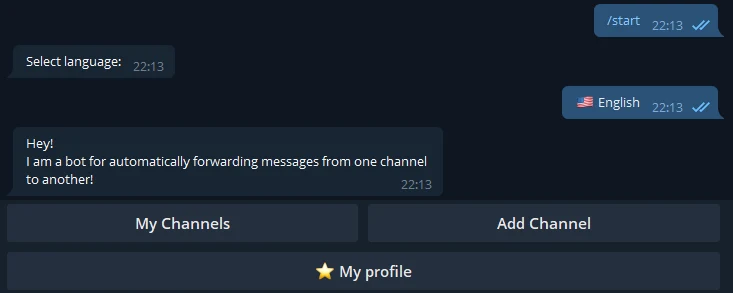
The bot asks for a language first, then shows its menu. Add Channel is the one that starts a new pair. - 4
Choose Add Channel. That starts the two-question exchange that links one source to one destination. Run it again for each further pair.
- 5
Forward a post from the channel you want to copy FROM. The bot asks for a native post forwarded out of the source channel. Any existing post will do. That is how it learns which channel to watch, without you having to look up a numeric ID.
- 6
Forward a post from the channel you want to copy TO. Post anything in the destination channel and forward that across as well. The bot answers "Channel was successfully added" and the pair is live.
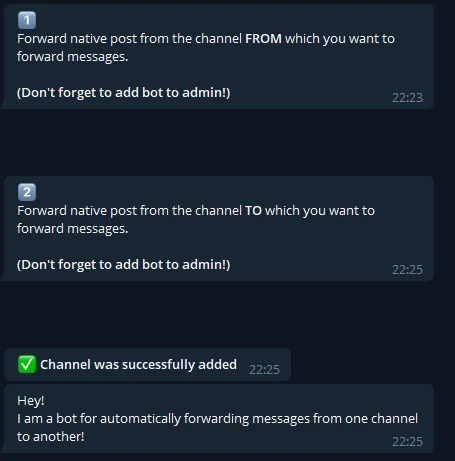
Two questions, in the bot’s own words: the channel to copy FROM, then the channel to copy TO. Each carries the reminder to add the bot as an admin, and the green line is what a linked pair looks like. - 7
Publish something in the source to confirm it works. The next post appears in the destination almost immediately. If nothing arrives, check the bot is an administrator in both channels, and that the source does not have Restrict saving content enabled.
What arrives in the destination channel
A real forward, carrying the “Forwarded from” header that names the source. That header is part of how Telegram forwards messages and this bot can’t remove it. Think about that before mirroring a private channel into a public one, because the private channel’s name becomes readable by anyone who can see the destination.
Everything else comes through as posted. Photos stay photos, albums stay grouped, files keep their names, polls arrive as polls. The copy is an independent message from the moment it lands, which has one consequence worth knowing: editing or deleting the original changes nothing in the destination.
What this Telegram auto forward bot can’t do
Four limits, and they’re better read now than discovered later.
- Channels you don’t run. Admin rights in the source are required, and only its owner can grant them.
- Restricted content. A channel with Restrict saving content enabled can’t be forwarded from at all. Telegram enforces that, not us.
- Groups. Channels only.
- Filtering. Every post goes across. No keyword rules, no link stripping, no rewriting.
Auto-forwarding without handing over your Telegram account
Search for a way to forward from private channels and most of what you’ll find works a different way: you give the service your phone number, the login code Telegram texts you, and your 2FA password. It then runs as you. That’s how those services reach channels you merely joined, including paid ones, and it’s why they can advertise support for “VIP” sources.
We won’t build that, and it’s worth being blunt about why. Those credentials are your whole account, not one channel. Telegram treats the pattern as abuse and bans for it. And the channels it unlocks belong to other people, who set them private on purpose.
An admin bot can only ever reach what you already control, which is a smaller promise and one we can keep. If your case is genuinely someone else’s channel, this tool won’t help, and I’d rather lose the visitor than pretend otherwise.
Telegram auto-forwarding — questions
- How do I forward messages from a private Telegram channel?
- If the private channel is yours, add @Autosendpost_bot as an administrator there and in the channel you want the posts copied to, then link the pair by forwarding one message from each into the bot. Every new post is copied from that moment on. Being private is no obstacle, because the bot reads the channel as an admin rather than from outside. If the channel belongs to someone else, there is no route. You cannot make a bot an admin in a channel you do not run, and no service can do it for you either.
- How do I automatically forward messages on Telegram?
- Telegram itself has no auto-forward setting. Forwarding by hand is the only thing the apps offer, so automation means a bot with admin rights in both channels, or a script running under your own account through the MTProto API. The bot route takes about two minutes and needs nothing installed. The script route is more flexible and considerably more work, and it puts your account credentials in a config file.
- Is there a bot that can automatically forward messages in Telegram?
- Yes. @Autosendpost_bot is one, and it is what this page documents. Add it as an administrator to a source channel and a destination channel, link them once, and new posts are copied across on their own. There are others, and several of them work by logging in as you instead. Read what a forwarding service asks for before you set it up: a bot needs admin rights in your channels, while an account-based service needs your phone number, your login code and your 2FA password.
- Is there a free Telegram auto forward bot?
- @Autosendpost_bot is free, and there is no cap on the number of channel pairs you connect. No trial, no per-message quota, no paid tier holding back the feature you actually came for. We run it as a utility for people running channels, and it stays free.
- Can I remove the "Forwarded from" label?
- Not with this bot. Posts arrive as genuine forwards, carrying the header that names the source channel, and that header cannot be switched off. Worth thinking about before you mirror a private channel into a public one, because the private channel’s name becomes visible to everyone who can read the destination. Stripping the label is possible in principle: instead of forwarding the message you re-send its content as a new post, which is what people mean by copying rather than forwarding. That is a different job and this bot does not do it.
- Can it forward from a channel I do not run, or one with saving restricted?
- No to both, and we would rather say so here than waste your two minutes. The bot has to be an administrator in the source channel, which only its owner can arrange, so someone else’s channel is out of reach. If a channel has Restrict saving content switched on, its posts cannot be forwarded at all — that setting exists precisely to stop this, and it is enforced by Telegram rather than by us. Services advertising that they reach paid or VIP channels anyway are running your own account against them, which is both against Telegram’s terms and a good way to lose the account.
- Does this work on iPhone, Android and desktop?
- All of them, and the device stops mattering after setup. The forwarding runs on our servers, not on your phone, so posts keep being copied while your phone is off, out of battery or in a different country. You only need Telegram on some device to do the one-time setup, and any client can do that.
- Does it work for groups as well as channels?
- Channels only. A group is a different kind of chat with different admin mechanics, and rather than half-support it we left it out. If your source is a group, this is not the tool.
- What happens if I edit or delete the original post?
- The copy stays as it was. A forward is an independent message rather than a live mirror, so editing the source post does not update what already went out, and deleting the source does not remove the copy. If you need the destination corrected, edit or delete it there yourself.
- Can I filter what gets forwarded?
- No. Everything published in the source is copied — text, photos, video, files, polls, albums. There is no keyword filter, no link stripping and no rewriting. If you need conditional routing, you want a workflow tool or a script against the MTProto API, not this.
Need the numeric ID of one of those channels? The chat ID finder resolves it. Writing the posts through a bot of your own? The formatter handles the escaping. The rest is on the tools hub.